








AI agents
Expertises
AI agents for business process automation
Every day, modern companies work in a complex operational ecosystem: documents, analytics, chats, CRM, ERP, internal regulations, etc. AI agents are a separate class of solutions that support employees in everyday operational tasks. They differ from chatbots in that they are not created to communicate with customers, but to help within business processes, for example, analyzing information, making decisions, preparing materials (under human control). AI agents are primarily intended for companies that have already established business processes, but seek to automate them, make them even more accurate and efficient.
At CortexIntellect, we develop AI agents for specific internal company processes — not a “universal bot,” but a solution that integrates into your systems (CRM/ERP/BI/chats) and delivers controllable results.

What are AI agents for business?
An AI agent is an autonomous assistant to an employee, working with systems, regulations, corporate information and ensuring the implementation of specific work scenarios. It does not make important decisions on its own, but strengthens the team. Employees perform their duties faster and more confidently, because the digital assistant takes on routine operations.
How does this happen in practice:
- the agent works with the context of the employee's work (role, process, task stage);
- has access to various company data;
- performs a set of actions or creates recommendations;
- is built into existing processes.
Where AI agents can work within a company
AI agents are most useful in places where employees are already performing their tasks. That's why they are connected directly to the company's internal infrastructure:
- CRM;
- ERP/back-office systems;
- corporate chats (Slack, Teams, Telegram);
- BI/analytics;
- internal portals and knowledge bases;
- email and documents.

What tasks do AI agents solve (business benefits)
AI agents cover entire workflows, from analyzing context to preparing a result and initiating the next step. Internal AI agents focus on specific business tasks for teams, so that employees can navigate through large amounts of data faster, adhere to standards, and perform their routine work with lower time and operational costs — all without losing quality and control. Here are the key tasks they solve.
- Reducing manual workload by performing repetitive actions instead of a person.
- Accelerate decision-making — independently creates draft documents based on task context and templates;
- Single access to knowledge — employees don't need to browse dozens of files and systems, as they receive structured answers from an AI agent.
- Error reduction — checks work results for compliance with internal company rules and standards.
- Increasing employee productivity — takes on routine tasks, allowing employees to focus on priority tasks.
- Process standardization — provides a single logic of actions in repetitive situations for all employees.
- Supporting new employees in the onboarding process — providing guidance on work rules, processes, tools, etc.
- Rapid detection of deviations and problems in processes — analyzes information about tasks and their statuses and reports on atypical situations.
- Reducing the burden on experts and managers — processes some of the typical requests and checks .
- Improving internal communication between teams — helps coordinate information between departments and minimizes the number of clarifications.
- Accelerate decision-making — provides ready-made analyses, action options, and recommendations. As a result, the team determines next steps faster.
- Monitoring compliance with SLA and business processes - monitors compliance with standards and regulations; signals deviations and risks.
Metrics that typically improve:
- task completion time;
- speed of team response;
- workload on employees;
- SLAs for internal processes;
- accuracy and completeness of data.

Typical AI agents for internal processes
AI agents connected to CRM, ERP, corporate chats or analytical platforms perform specific functions: from preparing documents and monitoring compliance with regulations to analyzing information and providing tips on next steps. Below are examples of typical AI agents that are often implemented in medium and large businesses and demonstrate the positive impact of automation on the speed and quality of a company's work.
CRM Sales Agent
The essence: a digital assistant for the sales team. Works in the CRM system and can connect to all communication channels used by managers. The main task of this AI assistant is to optimize the manager's daily work and provide support in the effective process of conducting deals.
What it does: Analyzes customer correspondence, tracks deal and interaction history, identifies priority contacts, and suggests next steps for each deal. It also suggests how best to respond to the customer and sends notifications about priority tasks.
Integrations: CRM, email, corporate chats (Slack, Teams, Telegram).
Effect: Thanks to the AI agent, managers save working time by not spending it on routine tasks. They also do not risk missing an important customer contact or deal stage. Thus, sales work becomes more consistent and the decision-making process is accelerated.
Engineering Knowledge Agent
Bottom line: a specialized internal AI assistant for technical teams.
What it does: searches for answers in technical documentation, code repositories, solution archives; explains architecture; suggests best practices.
Integrations: GitHub/GitLab, Confluence, technical documentation, chats.
Effect: Dependence on key experts is reduced, onboarding and development are accelerated.
HR Operations Agent
Essence: AI assistant for internal HR processes and personnel work.
What it does: responds to typical employee requests (vacation, sick leave, policies); supports onboarding and adaptation; maintains employee profiles and HR events; analyzes resumes, helps recruiters with selection; generates HR analytics (turnover, time-to-hire, engagement).
Integrations: HRM/ATS, document management, corporate portals, internal chats.
Effect: less HR routine, faster hiring and onboarding, transparent HR data. Thus, employees receive answers faster.

Internal Knowledge Agent
The bottom line: An AI agent becomes a single point of access to a company’s internal knowledge — instructions, regulations, documentation, product descriptions. As a result, employees can quickly access the information they need .
What it does: the agent searches for answers in the knowledge base, documents, and internal portals; selects relevant sources for the employee; displays ready-made links and recommendations.
Integrations: internal portals, knowledge bases, document management, corporate chats.
The effect: employees quickly receive answers to their queries and do not waste time searching for information. Thus, the workload on experts is reduced, and task performance becomes more consistent.
Marketing Intelligence Agent
Bottom line: It's an analytical assistant for the marketing team that monitors the market and competitors' actions in real time. It also gives employees tips on market changes and new opportunities.
What it does: monitors competitors' websites and social networks; records activities and publications; sees changes in prices, offers, advertising campaigns. The agent signals a possible risk, draws conclusions based on analytical data regarding future actions.
Integrations: BI systems, analytical platforms, external data sources, corporate chats for notifications.
Effect: Thanks to the work of an artificial intelligence agent, the marketing team quickly responds to market changes, receives structured information on the basis of which further decisions can be made and strategy adjustments can be made. This has a positive impact on the accuracy of campaign planning.
Sales Documents Agent
Bottom line: An AI agent prepares various types of supporting and commercial documentation, such as technical specifications, invoices, and commercial proposals.
What it does: To generate documents quickly and without errors, it works with the context of transactions and analyzes communication history, as well as independently substitutes data from CRM or ERP.
Integrations: CRM, document management, email.
The effect: managers no longer create documents manually. As a result, the number of errors decreases, and the preparation of materials becomes more qualitative and predictable.
Not sure what type of AI agent you need? CortexIntellect can conduct a brief audit of your processes and offer 1–2 scenarios for Pilot/MVP to quickly test the value of AI on real team tasks.

Typical scenarios for using AI agents
Each of the application scenarios below demonstrates the interaction of an AI agent with information, employees, and systems, and also reflects the effect on the team.
1. Preparation of a commercial offer
Task: to quickly form a commercial offer in accordance with the context of the transaction.
What the agent does: analyzes correspondence with the client, reviews the status of the agreement, extracts key requirements, inserts data into the CP template, and generates a draft document.
What data does it work with: CRM, email, commercial offer templates, transaction history.
Where to write the result: to the document management system or CRM.
Effect for the team: consistent work with clients; acceleration of the cycle of preparing commercial offers; reduction of manual work.
2. Checking compliance with regulations
Task: Ensure that processes and documents comply with internal rules and policies.
What the agent does: analyzes documents, applications, reports or employee actions, compares with regulations and reports errors.
What data does it work with: internal regulations, policies, document flow, CRM/ERP.
Where does the result go: to the corporate chat or a report in the internal control system.
Effect for the team: no risk of rule violations; reduced time for manual verification; increased quality of processes.

3. Preparation of internal reports
Task: generate regular reports for teams and management on time.
What the agent does: collects data from CRM, ERP and BI systems; aggregates information; generates analytical tables or graphs; creates a draft report.
What data does it work with: CRM, ERP, BI, internal databases.
Where does the result go: to a BI platform, document management system, or corporate portal.
Effect for the team: fast and accurate reporting. Managers receive ready-made information for decision-making.
4. Responses to internal employee inquiries
Task: to promptly provide accurate answers to recurring requests from colleagues.
What the agent does: searches for information in knowledge bases, documents, and regulations; generates a response and attaches links to sources.
What data does it work with: internal portals, knowledge bases, documentation, corporate chat.
Where to write the result: to the corporate chat or internal mail.
Effect for the team: prompt resolution of issues; improved communication between departments; reduced calls to experts.
5. Onboarding new employees
Task: to support new employees during adaptation and training.
What the agent does: provides guidance on processes, tools, and work rules. Provides answers to common questions and helps you complete your first tasks.
What data does it work with: regulations, documentation, internal portals, knowledge bases.
Where to write the result: to the corporate chat or the onboarding system.
Effect for the team: faster adaptation of newcomers; less burden on HR and mentors; standardized training.

6. SLA control and process execution
Task: monitoring task performance and compliance with internal quality standards.
What the agent does: monitors task statuses in CRM/ERP, compares with SLA, and reports deviations.
What data does it work with: CRM, ERP, internal processes and standards.
Where the result is written: sends messages to corporate chats or analytical panels.
Effect for the team: quality control of processes without manual monitoring; prompt response to violations.
7. Sales funnel analysis
Task: Quickly analyze sales performance and funnel bottlenecks.
What the agent does: studies deals at different stages, identifies delays or potential risks, and makes recommendations for managers.
What data does it work with: CRM, transaction history, communication with customers.
Where does the result go: analytical panels or reports for sales managers.
Effect for the team: quick identification of problem areas in sales, providing information to improve conversion.
8. Automation of preparation of technical specifications and internal documents
Task: Create technical specifications and internal documents based on the existing context.
What the agent does: extracts information from previous projects and correspondence, forms the structure of the document, and substitutes key parameters.
What data does it work with: CRM, email, document templates, internal knowledge base.
Where does the result go: to the document management system or project platform.
Effect for the team: speeding up document preparation, reducing manual work.
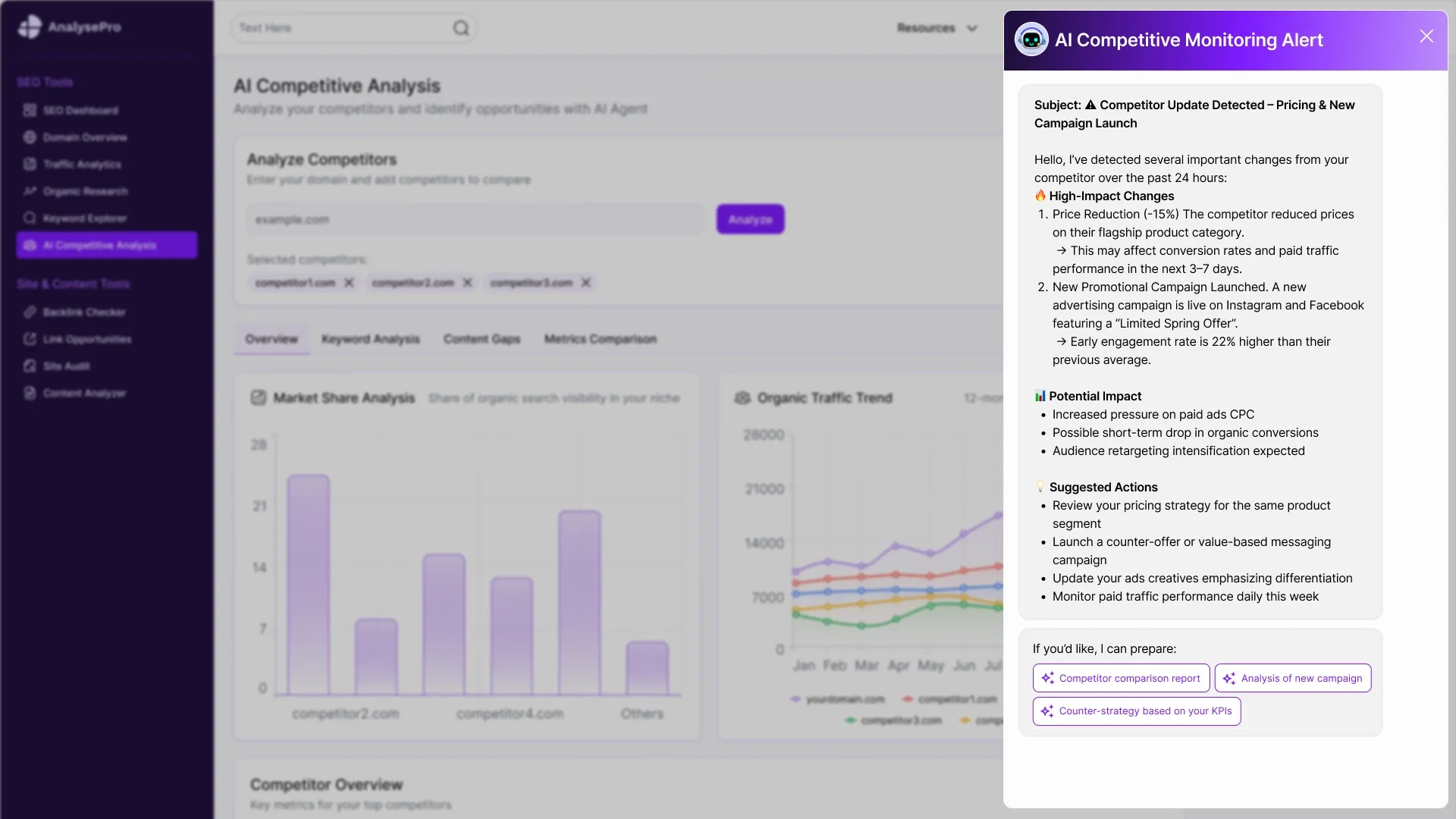
9. Competitor monitoring
Task: monitor competitor activities and record changes in the market.
What the agent does: monitors competitors' websites, social networks, and publications; signals important changes and insights.
What data does it work with: external data sources, BI systems, analytical platforms.
Where to write the result: pin it to the analytical panel or send a message to the corporate chat.
Effect for the team: rapid response to market changes; more informed planning of activities and strategies.
10. Task and priority management
Task: help the team organize and prioritize work tasks.
What the agent does: analyzes the list of tasks, their deadlines, dependencies, and the workload on the team as a whole; suggests the optimal order of execution.
What data does it work with: task management systems, corporate chats, calendars, and CRM.
Where does it write the result: to the task management system or report it to corporate chats.
Effect for the team: enables more effective planning of work processes; reduces the risk of missing important tasks; ensures an even workload for employees.
Mini-scenarios (user flows)
These mini-scenarios provide a clear understanding of how AI agents work in practice. They show how the digital assistant integrates with CRM systems, internal portals, and knowledge bases, supporting the team in everyday operational tasks.
Mini-scenarios (user flows)
- Creating a commercial offer
Step 1: An artificial intelligence agent analyzes the transaction history in the CRM system, reviews the manager's correspondence with the client, in order to determine key requirements and context.
Step 2: AI suggests the structure of the commercial offer and generates a draft document in CRM.
Step 3: The manager checks the offer in CRM and confirms its readiness for sending.
Step 4: The document is automatically saved in the document management system and is available for sending to the client.
- Internal report preparation
Step 1: The digital agent collects and analyzes information from CRM, ERP, and BI systems. It then summarizes key performance indicators and deviations from the plan.
Step 2: AI suggests the report structure in the BI system and generates a preliminary version with tables and graphs.
Step 3: The employee checks the information in the BI system and confirms the correctness of the report.
Step 4: The report is automatically recorded in the corporate system and sent to management.
- Response to internal request
Step 1: The AI agent analyzes the employee's request in the corporate chat, checks internal knowledge bases and regulations.
Step 2: In the chat or portal, the AI offers an answer with links to sources and recommendations for action.
Step 3: The employee reviews the response in the corporate chat and confirms it for sending.
Step 4: The response is automatically sent to the corporate chat and recorded in the system for future use.

- Automatic generation of process correction tasks
Step 1: The agent analyzes task execution information in CRM and ERP. It detects deviations from standard processes or SLAs.
Step 2: In the project management system, AI proposes a specific task for process correction, describes the actions that should be performed, determines the priority and deadlines.
Step 3: The manager or responsible employee reviews the task and confirms its creation in the project management system.
Step 4: The task automatically appears in the project management system, and the team receives a notification about it.
- Preparing the candidate for the interview stage
Step 1: AI studies the vacancy, takes into account the requirements for the role, the candidate's resume, and the communication history in the HR system or ATS.
Step 2: In the HR system or corporate portal, the agent creates a short profile of the candidate. It notes the suitability of the requirements, strengths, risks. It also provides a list of recommended interview questions.
Step 3: The recruiter or hiring manager checks the profile and confirms its use in the HR system/corporate portal.
Step 4: The candidate's profile is automatically saved in the ATS and available to all interview participants.
- Support for engineers in working with technical documentation
Step 1: An engineer or technical specialist creates a request in a corporate chat or internal portal. He notes the code, incidents, internal standards, architecture.
Step 2: In the company's internal environment, the agent analyzes technical documentation, code repositories, RFCs, runbooks, and incident history — and uses a RAG approach for this.
Step 3: In the corporate chat/technical portal, AI offers an answer option with technical explanations, links to sources, and recommendations for further actions.
Step 4: The engineer verifies the answer and confirms its use. The finished result is stored in the knowledge base for reuse.

How it works inside (AI-pipeline)
Here is a typical AI pipeline that digital agents use:
- Context understanding — AI independently determines who initiated the request, in which system it works, and within which process the task arose. This allows taking into account the user's role, access rights, current task status, and business context;
- knowledge base work (RAG) — the AI agent refers to the company's internal regulations, instructions, documentation and knowledge bases and uses only relevant and authorized sources. It also works with external resources, for example, when monitoring competitors' actions or searching for resumes. All answers are formed with a reference to specific documents and sources of information;
- correspondence and data analysis — the agent analyzes communication history, checks deal statuses, monitors process indicators or other structured data from CRM, ERP or BI systems;
- recommendation generation — the AI agent generates a suggestion based on the collected context;
- Calling actions via API — when an employee approves an action, AI creates a document, sets a task, updates its status, and sends a message. Actions are performed via the official APIs of integrated systems.
- logging and analytics — the agent's work is recorded: you see what information was used, what solution was proposed, and who confirmed it.
Architecture and security
Architecture and security issues are a basic condition for implementing an AI agent, as it works with corporate information. We build the architecture so that the agent can act within the limits of its authority, and the person always remains in the control loop.
- Access and roles — The AI agent works according to the roles and access rights of users in CRM, ERP, and other systems. It uses only the data to which a specific employee or process has access.
- PII/masking — you can automatically restrict access to personal or sensitive information.
- Action audit — any agent actions (requests, operations performed, sources used, results offered) are logged to ensure full traceability and the possibility of internal or external auditing.
- Quality control — the results of the digital assistant’s work can be checked against quality metrics or predefined rules. This way, you can quickly spot incorrect recommendations and errors and improve scenarios in the future.
- Human-in-the-loop — the most important actions, for example, changing statuses, creating documentation, launching processes, are performed only after approval by the employee.
Limitation and control (AI stop)
The logic of AI agents is built in such a way as to limit autonomy at critical points of processes and ensure full control by the company. We note exactly where the line of responsibility of AI is drawn .
- Where AI makes decisions independently : the agent can analyze data, identify patterns, and suggest different options for action.
- When human confirmation is required : Only after approval by the employee are documents created, processes launched, statuses changed, or messages sent.
- What actions are prohibited without confirmation : creating or editing financial/legal documents; final approval of any transactions or operations; changing key system settings or accesses; sending official messages to customers or partners; any actions that may lead to financial or reputational risks.
How we implement AI agents
Implementing an AI agent is a sequential process of integration into a company's operating model. We describe the key stages that ensure the correct operation of agents.
- Discovery (goals and scenarios definition). Together with the client team, we define business goals, key use cases, and KPIs. We examine processes that have too much manual work that an agent can help with, and we also capture decisions that are left to employees.
- Scenario design (dialogue logic development). We design the logic of AI agents in specific processes: sales, marketing, operations, back office.
- Knowledge & RAG (information structuring). We structure the company's internal knowledge: regulations, instructions, documents, directories, CRM or ERP data. We configure the RAG approach so that AI agents work only with relevant information and can always refer to sources.
- AI Development (development and configuration of an AI agent). We connect the appropriate AI model, configure it for specific business tasks and usage scenarios. We implement the logic for processing requests, taking into account restrictions, security rules, and human-in-the-loop mechanisms.
- Integrations (connection to CRM and other systems). We connect agents to CRM, ERP, BI, corporate chats, document management systems and other tools. We configure actions via API: creating documents, tasks, updating statuses, sending messages. All results of agents' work are immediately recorded in the systems that the team works with.
- Testing (testing in practice). We test the AI's performance in real scenarios: common tasks, non-standard requests, peak loads, edge cases. We check the confirmation logic, the correctness of information, and the agent's behavior in situations where team intervention is required.
- Launch (launch into working mode). We launch the AI agent into the company's working environment. We provide the team with usage regulations, configure access, and conduct a short training session for employees.
- Continuous improvement. After launch, we analyze agent usage, assess the quality of results and the workload on the team. If necessary, we expand scenarios, add new data sources, or optimize the work logic in accordance with changes in business processes.
Cost and terms
The table below demonstrates what AI agent formats are possible, how they differ in complexity, and what timelines and budgets to expect.
| Level | Solution composition | Term | Budget |
|---|---|---|---|
| Pilot / MVP (quick launch for hypothesis testing) | 1–2 basic scenarios, minimal or no integrations, working with a limited data set, simplified logic, no automatic actions, human-in-the-loop by default | 1.5–2 months | $10k-25k |
| Business (full-fledged solution for daily work) | Multiple scenarios, integration with CRM and internal systems, structured data processing, role and conditional logic, action control through mandatory confirmation by an employee (human-in-the-loop) | 2–3 months | $25–60k |
| Enterprise (scale solution for complex processes) | Complex business logic, multiple AI agents, advanced human-in-the-loop, analytics, enterprise-grade security, custom integrations | 3–5 months | $60k+ |
*Prices and terms are provided for guidance and help to assess the scale of the solution. The exact cost will be determined after the discovery phase.
The calculation of the final cost and terms is influenced by:
- number and complexity of integrations;
- data volume and structure;
- requirements for security and handling of personal information;
- complexity of scenario logic and rules;
- the role of the human in the process (human-in-the-loop).
What is required from the client?
To begin developing and implementing an AI agent and ensuring its correct operation in accordance with your business rules, we need input from the client:
| Data | Format | Who provides | When |
|---|---|---|---|
| Documents and regulations | PDF/DOCX/links to internal databases | Business owner, operations manager | Discovery |
| CRM/ERP structure | Description of fields, statuses, roles, accesses | IT/CRM Administrator | Discovery/Integrations |
| Data examples | Test leads, applications, reports (without PII or with masking) | Business or IT team | Knowledge & RAG |
| Access rules and restrictions | Description of roles, allowed actions, critical areas | Security/IT/management | Script design |
| Integrations | API documentation, webhooks, accesses | IT department or contractor | Integrations |
Investing in AI now means laying the foundation for scaling your business, optimizing resources, and improving team productivity before your competitors do. Implementing AI agents increases employee productivity, helps automate routine tasks, standardize processes, and provides rapid access to knowledge and analytics. For your business, it’s an opportunity to achieve business goals faster and focus on strategic priorities.
Leave a request on our website and we will prepare a demo and concept of an AI agent, adapted specifically to your scenarios.
FAQ
-
How does an AI agent differs from a chatbot?
An AI agent works within business processes: it understands the context of the role/task, pulls data from CRM/ERP/BI, prepares the result, and can initiate the next steps through integration (with human confirmation). A chatbot is usually focused on dialogues and responses to customers.
-
Where exactly can an AI agent work in a company?
In CRM, ERP/back-office, corporate chats (Slack/Teams/Telegram), BI/analytics, internal portals and knowledge bases, email and document management — that is, wherever the team is already doing its work.
-
What data is needed to get started?
Minimum: regulations/instructions (PDF/DOCX or links), description of the CRM/ERP structure (fields, roles, statuses), examples of test data (without PII or with masking), access and restriction rules, API documentation for integrations.
-
How much does it cost and how long does implementation take?
- Pilot/MVP: 1.5–2 months, from $10k (1–2 basic scenarios, minimal integrations, no auto-actions, human-in-the-loop).
- Business: 2–3 months, $10–25k (multiple scenarios, integrations with CRM/internal systems, role-based logic).
- Enterprise: 3–5 months, $25k+ (multiple agents, complex logic, analytics, enterprise security, custom integrations).
-
How is security and access control ensured?
Through a role-based access model in systems, PII/masking, logging and auditing of actions, quality control of results, and a human-in-the-loop approach for critical operations.
-
Can an AI agent perform actions independently?
It can analyze and make recommendations (action options, document drafts, detection of deviations). However, creating documents, launching processes, changing statuses, and sending messages can only be done after confirmation by an employee. There is also a list of actions that are prohibited without confirmation (financial/legal operations, changing access, etc.).