











AI page audio assistant is an intelligent module that allows you to listen to page content in different modes. The solution will be integrated integrated into websites:
How does the tool work in practice?
- the system determines the content of the page;
- separates the main content from unnecessary elements and prepares it for further processing;
- generates a concise summary or explanation using artificial intelligence;
- converts text to audio using TTS.
The solution is implemented in the format of a compact widget with a mini-player that supports several interaction scenarios – from full page narration to a quick overview of the content or a simplified explanation of complex materials.




Business problem
Most users don't read long pages – content is scanned, not processed. Long texts, even if they are of high quality, lose attention on the first few screens.
Complex material is even more difficult to digest. Topics like AI, crypto, or professional services require context and explanation, but in text format, this creates an additional burden on the reader. As a result, some of the content is simply ignored or misinterpreted.
The level of engagement also drops: users do not reach the main blocks, do not delve into the details and leave the page. At the same time, there is no alternative to text – if there is no time or desire to read, interaction with the content stops.
Additionally, there is the problem of quickly understanding the essence. To catch the main idea of the page, you have to spend time reviewing the entire material.
Project goal
The main goal of the project is to create an AI module that transforms the way we interact with content and expands its consumption scenarios.
The solution is aimed at:
- provide the ability to listen to the content of pages in a convenient format;
- simplify the perception of complex content through structured presentation and explanation;
- increase user engagement and page interaction time.
The focus is not on a separate function, but on a holistic tool that improves the accessibility of information and makes content more understandable, regardless of its complexity.
Operating modes
The module supports three usage scenarios, each of which meets a specific user need – from fully listening to a page to instantly understanding the content or a simplified explanation.
Read page
What is happening:
- the current page is determined;
- the main text is extracted;
- unnecessary elements are removed;
- the prepared text is transmitted to TTS;
- audio is playing.
The mode is suitable for fully familiarizing yourself with the page in audio format without losing content.
Listen summary by AI
What is happening:
- the page content is extracted;
- is transferred to LLM for processing;
- a concise statement of the main theses is formed;
- the result is sent to TTS;
- audio is playing.
The script is focused on instant understanding of the essence without delving into details.
Ask AI to explain this page
What is happening:
- the page content is extracted;
- transferred to LLM;
- a simple language explanation is generated;
- the result is transmitted to TTS;
- audio is playing.
The mode is used to interpret complex content when additional clarification and simplification of presentation are required.
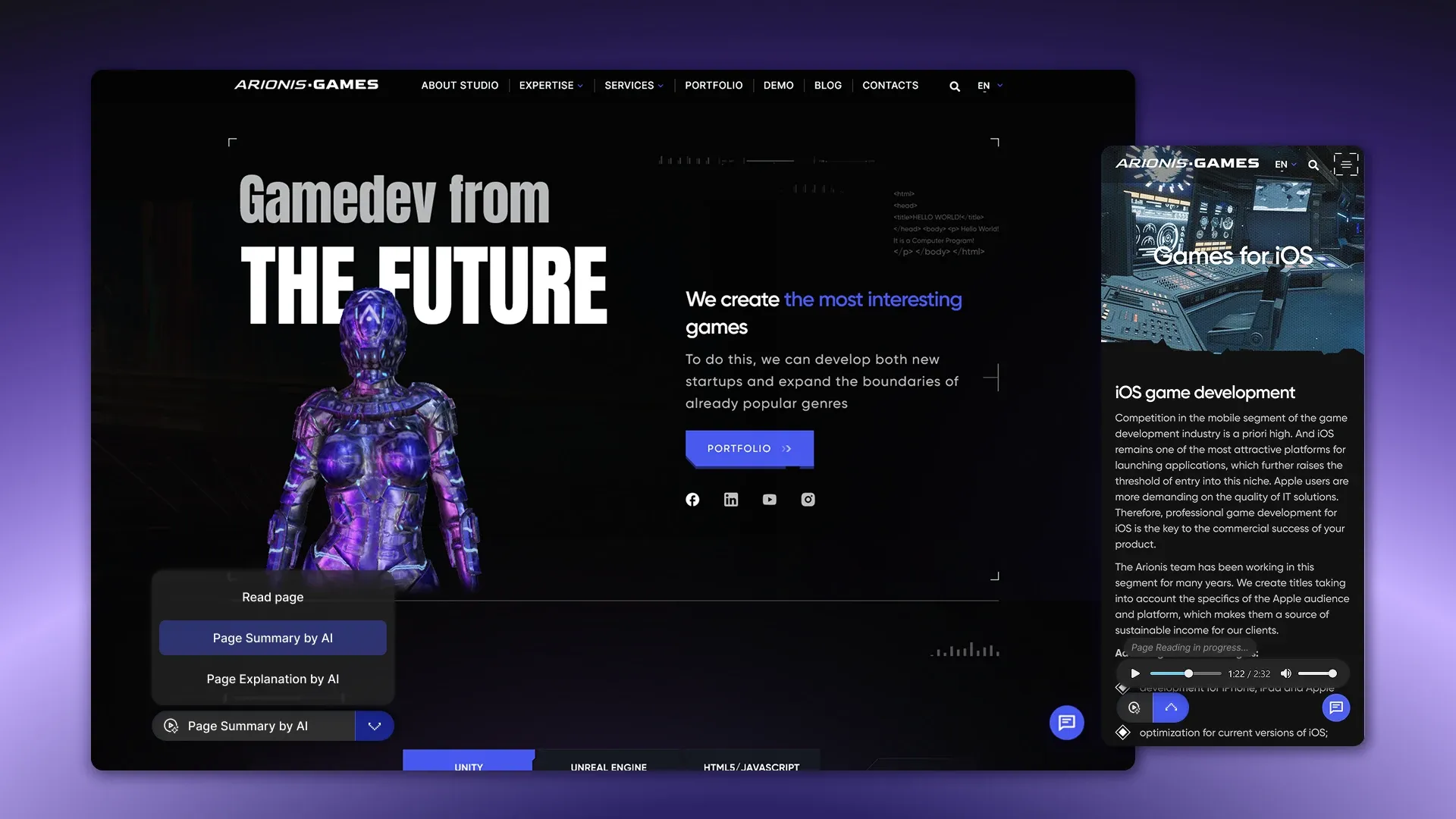
UX interface
Interaction with the module is implemented through a compact widget integrated directly into the page. The activation button is placed in the visible area of the interface and provides access to all available operating modes.
After launching, the user receives a list of scenarios: page narration, brief presentation, or explanation. Switching between modes is quick and does not require reloading the page.
The main element of the interface is a mini-player, which provides full control over playback:
- playback control (Play / Pause / Stop);
- playback progress indicator for audio navigation;
- speed adjustment (1x / 1.25x / 1.5x);
- display of current time and duration;
- the ability to close the player.
Additionally, there are download statuses that inform about the processing of the request, as well as displaying the total duration of the audio. For the user's convenience, a text transcript is available that synchronizes with playback and allows you to read in parallel or quickly find the necessary fragments.
Content extraction logic
The system works according to a clear scheme to ensure the cleanest and most relevant content for future processing and annotation. It extracts the main content of the page, ignoring service elements that do not carry a semantic load for the user.
What is extracted:
- page title;
- main text;
- structural sections;
- lists.
What is missing:
- site header;
- footer;
- navigation menus;
- pop-up windows;
- cookie notification.
Processing flow by mode
Each module mode has a clear chain of actions, ensuring fast and reliable audio reception for the user.
- Page voiceover: request → content extraction → conversion to audio via TTS → caching → playback.
- AI summarization: content extraction → LLM processing → summarization → TTS → caching.
- AI page explanation: content extraction → LLM processing → explanation generation → TTS → caching.
Solution architecture
Frontend
- The widget → integrates into the page, provides access to all operating modes, and opens a mini-player to control audio playback.
- Mini-player → is responsible for controlling playback (Play / Pause / Stop), adjusting speed, showing progress and time, and displaying download status.
- API calls → guarantee data exchange between the frontend and backend, transfer page parameters, operating mode, and playback settings.
Backend
- Content extraction module → extracts the main text of the page, structural sections, and lists, ignoring auxiliary elements.
- AI processing → is responsible for generating concise statements or explanations in simple words using LLM.
- TTS module → converts text content into audio.
- Caching → stores the results of content selection, overview, explanations, and audio for quick replay.
External services
- ElevenLabs → is responsible for natural speech synthesis.
- OpenAI → provides generation of concise statements and explanations through large language models.

Caching
To speed up the module and save resources, the processed data is stored in a cache. This allows you to reuse the results without re-processing the same pages.
What is stored in the cache:
- page content;
- concise statement;
- page explanation;
- audio.
Errors and recovery mechanism
The system provides for handling possible failures to ensure a continuous user experience.
- If content processing via LLM fails, the module automatically switches to page narration mode so that the user can listen to at least the basic text.
- In the event of a TTS error, the user receives a message that the audio cannot be played.
- If there is no content on the page, playback does not start, and the module remains inactive.
Analytics
To assess the effectiveness of the page's AI audio assistant, the main indicators of user interaction with the module are collected and analyzed. This approach helps to understand which modes are most in demand and how well the content is perceived.
- Launch by mode – records which of the three modes (page narration, summary, explanation) the user activates. Allows you to identify priority usage scenarios and optimize UX.
- Listening Duration – tracks the amount of time a user spends listening to audio. This metric shows how engaging and engaging the content is.
- Listening Percentage – reflects the portion of audio that the user actually listened to from start to finish. Helps assess how fully a person perceives the material and where attention lapses occur.
- Popular pages – analytics collects data on which pages users listen to most often. This allows you to highlight the most popular content and adjust your content delivery strategy.

Technology stack
- OpenAI (LLM) – used for text processing, generating concise summaries and explanations in simple words.
- ElevenLabs (TTS) – is responsible for natural speech synthesis and high-quality audio creation.
- Node.js / Python (backend) – guarantee the logic of content processing, AI processes, interaction with databases and external services.
- React / JavaScript (frontend) – responsible for the widget on the page, mini-player, mode management, and interactive UX.
- S3 / storage – serves to store audio and text processing results, providing data availability and reliability.
- Redis / cache – used to cache content, summaries, explanations, and audio. This speeds up replay and reduces system load.
Result
The introduction of the page's AI audio assistant has become a strategic step to improve the efficiency of user interaction with content on websites and digital services. The unique module provides comprehensive automation of narration, summaries and explanations, which significantly changes the way information is consumed. The module is easily integrated into any website, application or service, adapting to different platforms and business needs.
Business effect of implementation
- Increased engagement: users interact more with pages, switch between modes, and listen to audio to the end.
- Increased time on page: audio and interactive explanations motivate you to stay longer and delve deeper into the material.
- Improving content comprehension: Complex pages (AI, SaaS, services) become accessible thanks to concise presentation and explanations in plain language.
Want to add an AI audio assistant to your website?
We'll analyze your content, suggest optimal functionality, and implement a module tailored to your product's needs – from MVP to production. Submit a request – let's discuss your case.

