











The project developed and implemented a voice AI agent feature that allows managers to control the CRM system using voice commands instead of manual text entry. This solution significantly speeds up workflows and increases the efficiency of customer interaction.
How does the system work?
- records the user's voice;
- recognizes speech and converts it into text;
- improves text using AI;
- generates ready-made responses for clients (if necessary).
The solution is integrated directly into the AvadaCRM interface, which makes it convenient for daily use and allows you to maintain high team productivity.




How AvadaCRM works
AvadaCRM is a CRM system for managing sales, customer communications, and business processes. It helps managers effectively work with leads, manage deals, communicate with customers, capture comments, create notes, and send messages.
The main task of the system is to speed up the work of managers and increase sales efficiency, providing centralized and convenient management of all stages of communication with customers.
The problem faced by the business
In CRM, managers perform a large number of text actions every day: they respond to customers, write comments, record information about operations, create notes, and compose emails. This leads to certain difficulties:
- A large amount of manual input – most of the managers' working time is spent on manual data entry.
- Slow responses to customers – the more messages, the more time it takes to respond.
- Burden on employees – constant manual text entry reduces team productivity.
- Loss of information – managers often don't have time to write down details during calls.
Solution concept
The main goal of the project is to create an AI voice input tool that speeds up the work of managers within CRM.
Project objectives:
- add voice input;
- implement AI speech recognition;
- automate text creation;
- implement customer response generation;
- integrate the system into the CRM interface.
The voice AI agent works on the Push-to-Talk principle:
- The user presses a button.
- Speaks a voice command.
- Releases the button.
After that, AI independently recognizes speech, converts audio to text, processes the text, and returns the result to CRM.
The voice assistant is integrated into various sections of the system: customer chat, order cards, user cards, and internal chats, making it a universal tool for a manager's daily work.

User scenarios
Below are examples of how managers can use an AI agent in their daily work:
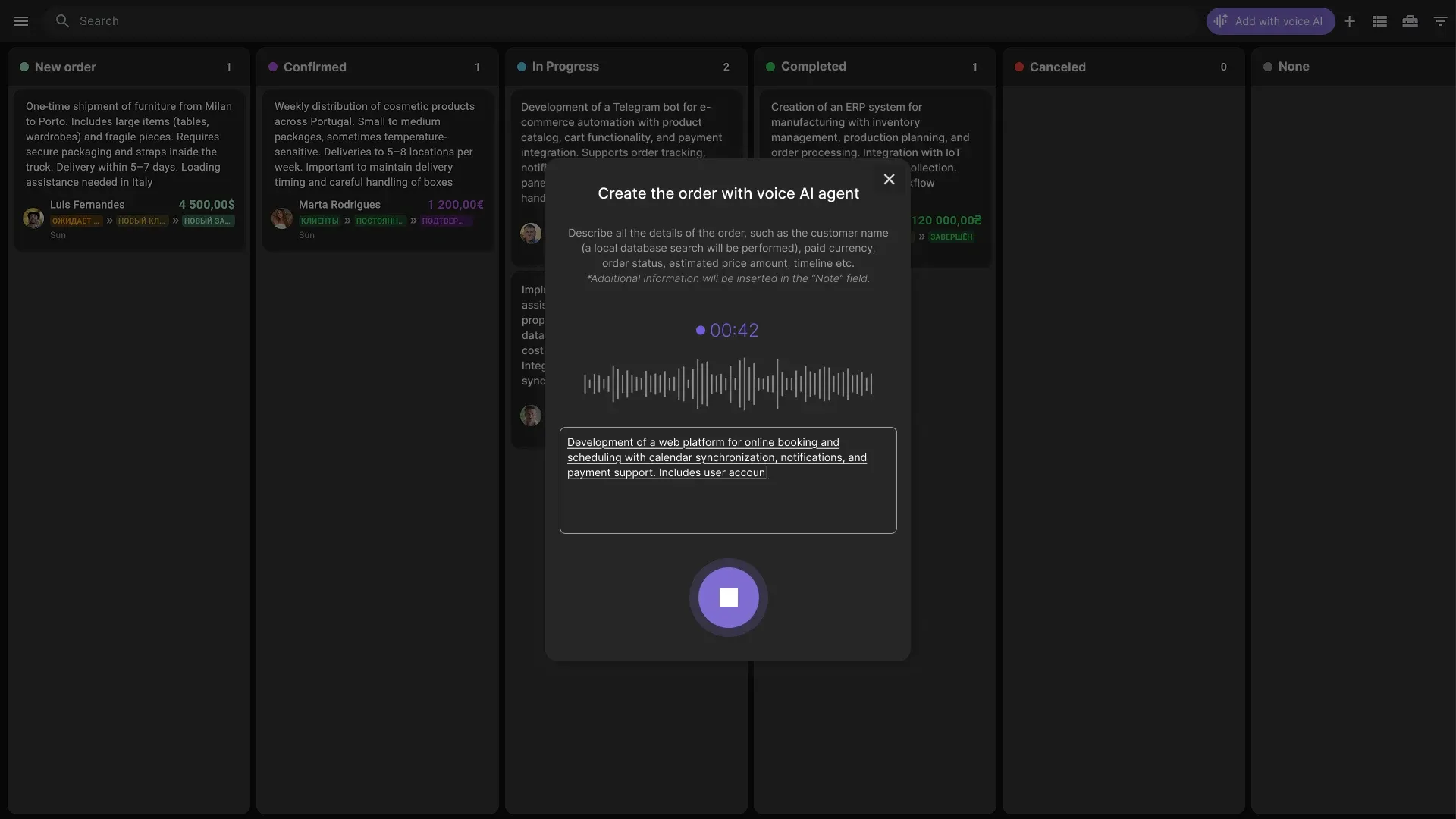
Creating a new order
The manager opens the order card, presses the voice input button and says:
"Create an order for Mykhailo, office cleaning on Friday at 10:00 AM." AI independently recognizes language, converts it to text, and fills in the appropriate fields in CRM.
Entering order details
For example, you need to add a clarification: “The client wants cleaning to be done in all offices at the same time.” This is easy to enter by voice, so the system immediately adds the information to the order.
Communication in chats
A manager presses the voice input button in a chat with a client or colleagues and dictates a message: “Hello! Please check the project status and send a report.” As a result, the text automatically appears in the chat without manual typing.
Internal notes and comments
During the call, the manager can quickly add a comment, for example: “The client noted that it is important to update the cleaning schedule for next week.” Artificial intelligence records the entry in the corresponding card or order.
Update tasks and statuses
The manager dictates: “Mark the order as completed and send confirmation to the customer.” The system automatically updates the status and prepares a message for the user.
Working in the activity feed
When receiving new information, the manager enters the text of the note by voice: “Evaluate the possibility of implementing a new project and prepare a report.” AI instantly processes the audio and saves the recording in the activity feed.

AI processing modes
To ensure maximum convenience and efficiency of the voice agent, CRM has implemented several voice data analysis modes. Each mode corresponds to different tasks of the manager – from simple speech-to-text transcription to automatic generation of ready-made responses.
Basic speech recognition
This mode is responsible for speech recognition and voice-to-text conversion. The AI also automatically inserts the result into the CRM input field. This mode is great for quickly capturing notes, comments, or order details without the need for manual typing.
Voice to Text
Voice to Clean Text mode performs AI post-processing of text to improve its readability. The system automatically:
- corrects errors;
- puts punctuation;
- removes parasitic words;
- increases the overall clarity of the text.
This way, managers receive clean and structured text, ready for future use in CRM or sending to the client.
Voice to Ready Reply
An advanced mode that analyzes the context of the conversation, the language, and the content of the voice instruction. Based on this data, the AI generates a draft response.
It is important to note that artificial intelligence only creates a draft – the message is sent manually by the manager, in order to maintain control over communication and maximize the correctness of the response.
Possibilities for future development of AI agent
In addition to basic voice processing modes, the AI agent can be enhanced with additional features (if needed). For example, the system can be expanded with the option of built-in transcription of telephone conversations, calls in messengers, or video conferences, such as Google Meet or Zoom.
This expansion will allow:
- automatically convert any voice communication into text;
- store all details of negotiations in CRM;
- increase the accuracy and completeness of information for analysis and further actions by managers.

Solution interface
The AI agent interface is designed to make the manager's work as easy as possible and make voice input intuitive. The main element is the voice recording button, which allows you to instantly start and end the voice input process.
How the button works:
- press and hold – voice recording begins;
- released the button – the recording is complete, and the system begins processing.
Button status during operation
- Waiting – readiness to record.
- Recording is an active process of capturing voice.
- Processing – the system converts audio to text and performs AI analysis.
- Result – text is placed in the CRM input field;
- Error – a reflection of the problem and the possibility of repetition.
Additional UX elements
- Recording timer – shows the duration of voice input.
- Microphone indicator – signals recording activity.
- Preview the result – the user sees the text before inserting it into CRM.
- Regeneration capability – allows you to quickly correct or rewrite text.
Where is the AI assistant used?
The AI Voice Assistant is integrated into various elements of AvadaCRM, allowing managers to use it in all key work scenarios. Here are the main places where AI Voice Assistant is used.
- Customer chats – quickly send messages and replies;
- Lead card – recording data and notes about a potential client;
- Deal card – adding details, statuses and comments;
- Manager's comments – quick entry of important information;
- Customer notes – quickly capture details of calls or meetings;
- Email drafts – text generation and preparation of finished emails.


AI Pipeline: How a Voice Assistant Works
To ensure prompt and correct processing of voice commands in AvadaCRM, the artificial intelligence agent works according to a clearly ordered chain of actions – AI pipeline, which includes several stages.
- Voice capture → the manager presses the record button in CRM, and the system captures the audio of the voice message, ready for processing.
- Audio processing → the recorded sound is sent to the server for analysis, where it is prepared for speech recognition.
- Speech recognition → AI model detects user's language and converts audio to text.
- Text processing → the system cleans and formats the text: corrects errors, adds punctuation, removes unnecessary words, and improves readability.
- Context analysis → if necessary, AI analyzes the context of correspondence or voice instructions in order to understand the user's intentions and the situation in which the text is entered.
- Response generation → based on the processed data, the system generates a draft message text or a ready-made response for the client, leaving the manager the opportunity to check it before sending.
- Result output → the finished text is returned directly to CRM, inserted into the appropriate field or chat, ready for use.
System security
The voice AI agent does NOT send messages automatically, does NOT make decisions for the manager, and does NOT create facts that are not in the instructions. All responses are formed only as drafts, leaving control over the communication with the user.
System architecture
The AI voice assistant is built on a modular principle, which ensures flexibility, reliability and scalability of the system. The architecture includes several main components that together allow you to convert the user's voice into accurate text and ready-made answers in CRM.
Main components:
- CRM frontend is a user interface where the manager interacts with the system: presses the record button, views the results, and works with text in chats, notes/order cards.
- Voice recording module – responsible for capturing audio from the user and preparing it for further processing.
- The AI processing service is a central module that coordinates all stages of voice-to-text conversion, analysis, and response generation.
- Speech recognition module – performs voice recognition, determines the user's language, and transforms audio into text.
- Natural Language Processing (NLP) – analyzes text, cleans it, determines context, structure, and user intent, preparing the text for response generation.
- Response generation module – based on the processed text and context, the system generates draft responses for clients or internal communications.

Technology stack
The voice AI agent uses a modern set of technologies to ensure correct and reliable processing of voice data in CRM. The main components are described below:
- AI for speech recognition – is responsible for accurately converting audio to text and determining the user's language.
- Natural language processing – the agent studies the text, determines the context, cleans and structures the information for subsequent actions.
- Machine learning – increases the accuracy of text recognition and processing, taking into account the language style and user behavior.
- Cloud AI services – provide instant processing of large amounts of data, scalability, and system stability.
- Web Audio API – used to capture and process audio directly in the browser, integrated with CRM.
- CRM integration API – allows you to seamlessly insert analysis results into various CRM elements: chats, order cards, notes, and email drafts.
Results
After implementing the voice AI agent in AvadaCRM, noticeable improvements were achieved in the work of managers and the efficiency of information processing, namely:
- Acceleration of managers' work – voice input allows you to quickly record data and communicate with clients.
- reducing the amount of manual input – the time spent typing text is reduced, which reduces the burden on employees.
- increasing the speed of responses to customers – managers respond to requests more quickly, improving the level of service.
- improved recording of transaction information – all notes, comments, and order details are automatically processed and structured.
Voice input is especially useful during chats, when using mobile devices, and for quickly taking notes after calls.
Want to implement a voice-activated AI agent in your CRM?
We'll analyze your work tools, design voice input logic, and integrate it. 👉 Submit a request – let's discuss your project.

