











 3
3
Financial documentation is one of the main sources of manual labor in B2B companies. Managers manually enter data from invoices, reconcile amounts, create reports, submit them for approval, and monitor statuses. This takes hours, and errors are inevitable: the human factor in routine work cannot be eliminated by administrative measures.
An AI agent in CRM is a fully-fledged digital agent that handles the entire document management cycle: from file receipt to archiving of the closed document. In this article, we'll explore how this automation works, what tasks it solves, and how it's been implemented in real-world projects.

What is an AI agent in the context of document management?
An AI agent in CRM is a software module capable of autonomously performing multi-step document processing tasks, making intermediate decisions, and interacting with other systems without human intervention. It's important to distinguish: this isn't just OCR scanning or template autofill, but a complete workflow that includes recognition, verification, routing, and execution.
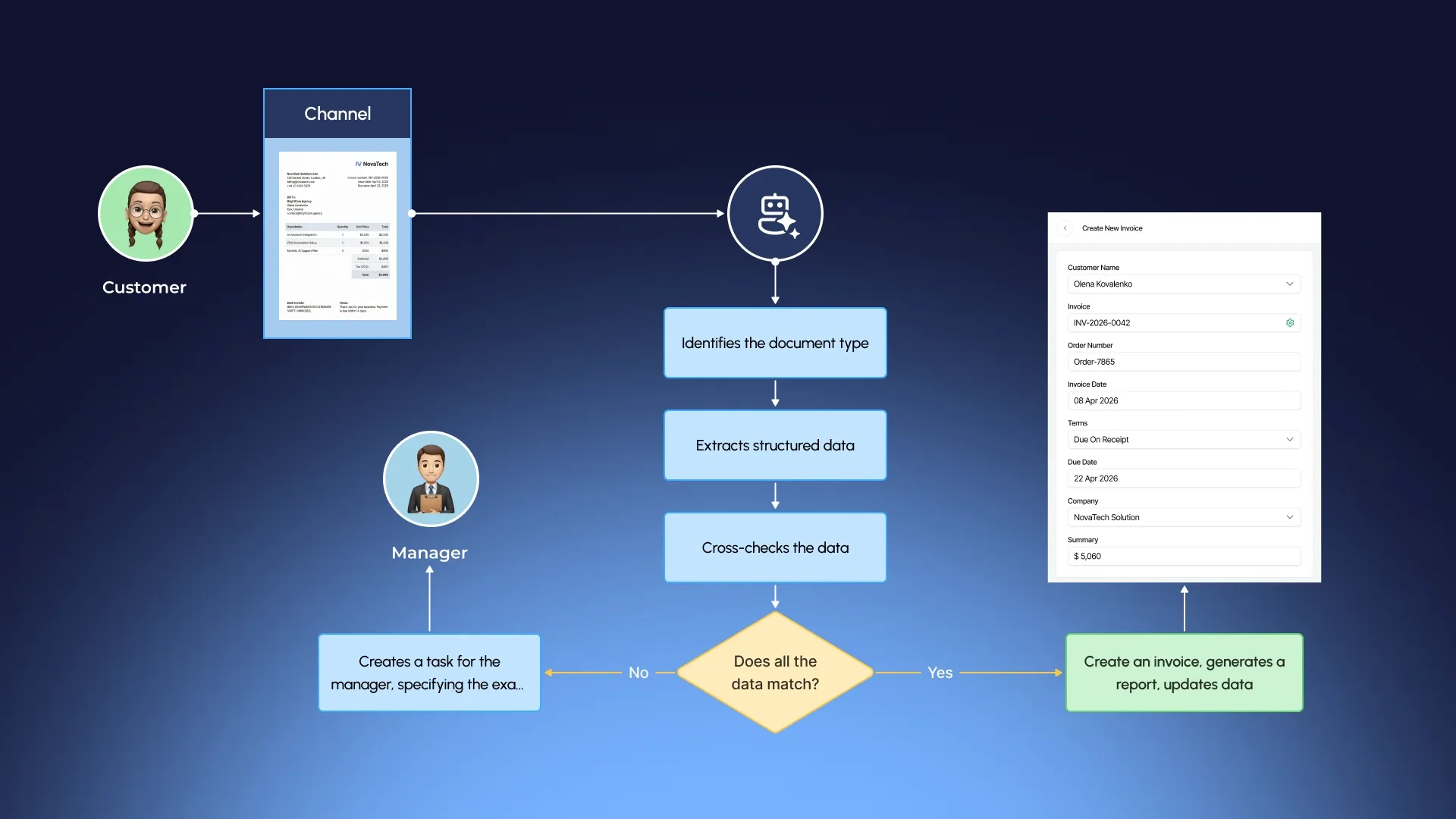
A typical scenario for an AI agent working with an invoice looks like this:
- The document enters the system via email, instant messaging, upload to your personal account, or API integration with an accounting service.
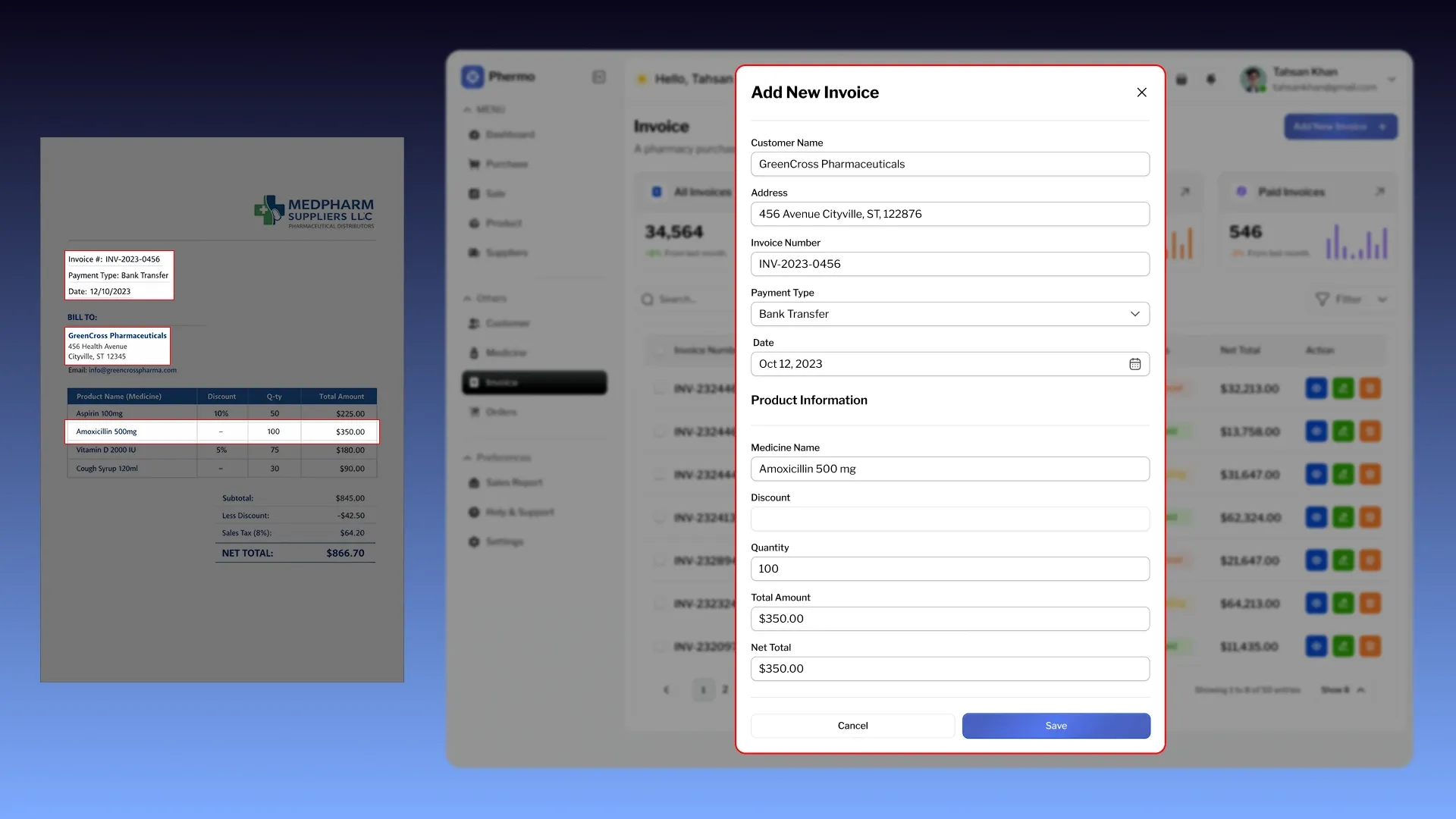
- The agent recognizes the document type and extracts structured data: number, date, parties, positions, amounts, and details.
- The data is verified against existing records in the CRM — orders, contracts, and counterparty cards.
- If there is a match, the agent automatically creates related records: posts the invoice, generates a report, and updates mutual settlements.
- In case of discrepancy, it creates a task for the manager indicating the specific discrepancy, without shifting all the work to him, but only the decision-making.
- After approval, the agent sends the document to the counterparty, records the status, and archives the closed cycle.
In this scheme, a human intervenes only where judgment is needed — in non-standard situations. Everything predictable and repetitive is handled by the agent.

Key functions of the AI agent when working with invoices and acts
1. Automatic recognition and data extraction
Modern AI models work not only with clear electronic PDFs, but also with scanned documents, phone photos of invoices, and files of various formats. The agent extracts data with an accuracy unachievable with manual entry, and does so several times faster.
The agent's ability to handle non-standard templates is especially important. Each supplier uses its own invoice format, and training the system to handle dozens of different document structures is a completely solvable task with the right architecture.
2. Data verification and reconciliation with CRM
After extracting the data, the agent does not simply store it, but checks the context for consistency:
- The amount on the invoice is compared with the order amount.
- The positions are checked against the nomenclature.
- The counterparty's details are checked against the database.
- The date of the document is consistent with the terms of the agreement.
This is a key difference from simple automation: the agent understands the business context, rather than simply transferring data from one field to another . Discrepancies are recorded with specific instructions on what exactly is wrong and how critical it is.
3. Automatic generation of acts
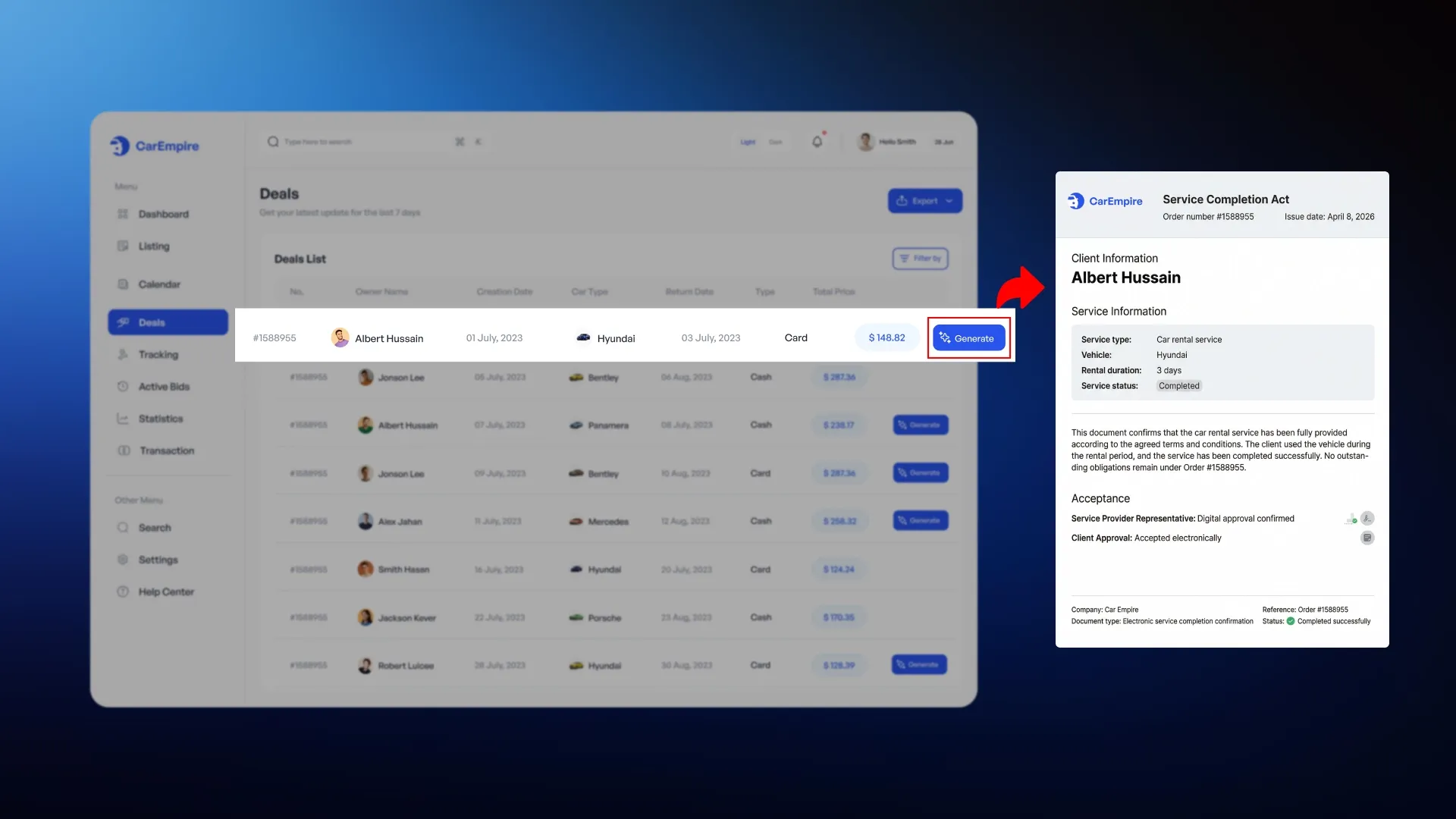
Based on a confirmed invoice or a closed transaction, the AI agent can independently generate a work completion certificate using a preset template. All details, items, and amounts are transferred automatically. The document is generated in the required format, signed electronically if integrated, and sent to the counterparty.
This eliminates one of the most painful gaps in document flow: days, sometimes weeks, passed between the closing of a deal and the issuance of closing documents — now this cycle takes minutes.
4. Managing statuses and notifications
The AI agent tracks the entire document lifecycle and automatically updates its status in the CRM:
- When a document is sent to a counterparty, the system records this action.
- As soon as the counterparty signs it, the status is updated.
- If a document is overdue, the responsible manager receives a reminder.
All status changes are logged with timestamps, providing a complete history of document movement.
5. Integration with financial accounting
Confirmed invoices and reports are automatically reflected in settlements with counterparties. The agent updates the balance sheet, generates entries in the integrated accounting system, or downloads the data in the required format. This closes the gap between operational and financial accounting, which is always present in a manual system.
What does this look like in practice?
Scenario 1: Incoming invoices from suppliers
- The supplier sends the invoice by email or uploads it to your personal account.
- The AI agent automatically extracts data, checks it against the open order in the CRM, and, if a match is found, records the receipt at the warehouse and updates the mutual settlements.
- If there is a discrepancy in quantity or price, a task is created for the manager indicating the specific discrepancies.
- The manager sees in CRM a structured problem, not a raw document.
A similar principle has already been implemented in the CortexIntellect case, where an AI agent independently recognizes incoming documents from suppliers, extracts key data, and structures it for purchasing decisions: AI agent for analyzing commercial proposals from suppliers.
Scenario 2: Closing documents for clients
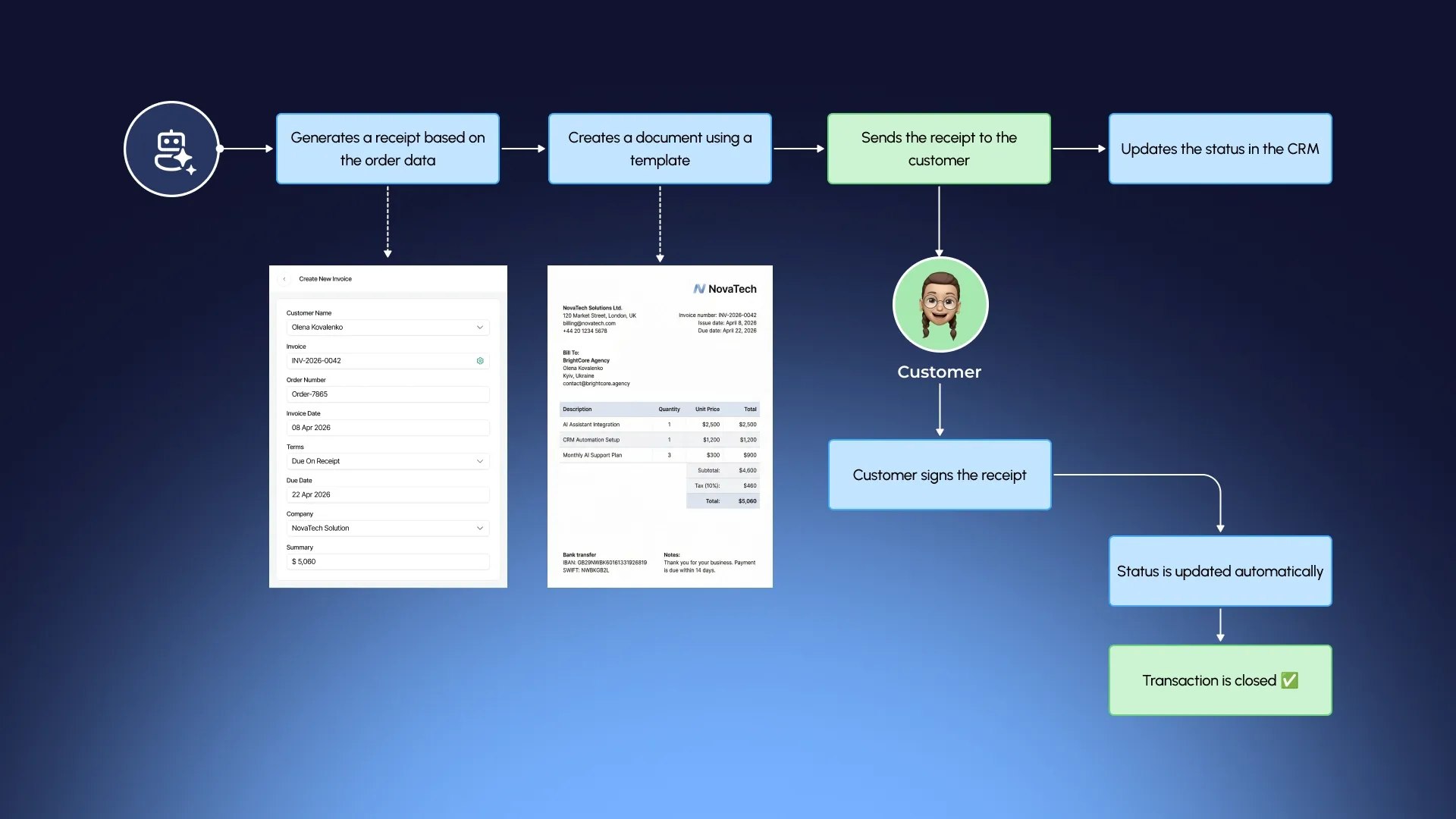
- Once a transaction is completed or work is completed, the agent automatically generates a report based on the order data.
- The document is generated using a template, with all details populated from the CRM. The report is sent to the client via an integrated channel (email or personal account), and the status is recorded.
- When the client signs the document, the status is updated automatically and the mutual settlements are closed.
Scenario 3: Reconciliation and control of accounts receivable
- The AI agent regularly analyzes the status of open documents: which invoices have not been closed by reports, which reports have not been signed, and which counterparties have overdue debt.
- Based on this analysis, automatic notifications are generated for responsible managers and, if necessary, reminder letters to clients.
- The manager receives a dashboard with an up-to-date overview of all open positions.
Scenario 4: Mobile work of field employees
- For companies with field employees — inspectors, couriers, sales representatives — the AI agent operates through a mobile app.
- The employee takes a photo of the invoice, the agent recognizes the data and enters it into the CRM. The acceptance certificate can be signed right on the spot.
- All operations are synchronized with the central system in real time.

Technical implementation: how it is built
The AI document processing agent isn't a standalone service connected to the CRM via a plugin. It's a module built into the system's architecture from the ground up: it works with a single database, has direct access to transactions, contractors, and inventory balances, and interacts with other modules without delays or data loss.
From a technical point of view, the implementation includes several layers:
- The document recognition engine is trained on the formats and templates of a specific company.
- Verification layer – compares extracted data with records in the CRM according to specified rules.
- The executive module creates records, updates statuses, generates documents, and initiates notifications.
All three layers operate via a REST API, allowing the agent to integrate with accounting systems, banking clients, and external services.
The development of such a solution goes through standard stages:
- Analysis of business processes and document flow of the company.
- Design of architecture and verification logic.
- Technical implementation and integration.
- Testing on real data.
- Launch and configuration for work scenarios.
Everything described above — document recognition, data verification, and automatic report generation — is implemented most effectively in a custom CRM designed for a company's specific processes. In a system designed for business, the agent works with real document formats from day one, takes into account employee roles, and is integrated into the process logic — without unnecessary settings or compromises.
Document automation is one of the many opportunities AI opens up within CRM. To learn about other features that can be integrated into a CRM system and how they work in practice, read the article: Top 10 AI Features for CRM That Will Improve Your Team's Performance.
Results achieved by companies that have automated document flow
- Reducing document processing time by 70-85%. Most standard operations are performed automatically, with managers handling only exceptions.
- Minimizing errors. Machine processing eliminates manual input errors, and the verification layer catches discrepancies before they become a problem.
- Complete transparency in real time. The status of every document is available at any time — no need to contact managers or reconcile email threads.
- Accelerating accounts receivable turnover. Automatically sending reports and reminders for overdue items speeds up the client document closure cycle.
- Scalability without staff growth. The company can increase its operations without having to hire proportionate administrative staff.
Want to discuss document automation for your business?
Write to us and we will analyze your processes and offer the optimal solution.

