











 562
562
A website has long ceased to be just a business card; it should function as the first point of contact with a client: answering questions, building trust, and encouraging them to submit an application. But this is where many business owners run into a bottleneck. A potential client lands on the website, doesn't find a quick answer to their question, and leaves. Managers spend several hours a day on repetitive consultations and collecting basic information. Applications arrive with incomplete information, and too much time passes before a real conversation takes place.
Artificial intelligence is changing the logic of this work. It takes over routine but critical tasks: initial communication, data collection, content generation, and user assistance at any time of day.
Below are ten features that really speed up the customer journey from their first visit to the site to the transaction.

1. AI-generated meta tags
Most websites lose organic traffic not because of poor content, but because their pages are technically invisible to search engines: the title is duplicated across multiple pages, the description is blank or copied from the first paragraph, and images have no alt text at all. Manually fixing this on a website with dozens or hundreds of pages is a task that is constantly put off.
The AI system analyzes the content of each page and automatically generates unique meta tags: a title with the appropriate length and keyword, a description that captures the essence of the page and encourages clicks in the search results, and alt text for images. The system takes into account the content structure, the page topic, and, if necessary, the semantic core defined by the website owner. The result is a technically correct SEO database for the entire website, without manual work, which directly impacts search visibility and snippet click-through rates.

2. AI audio page assistant
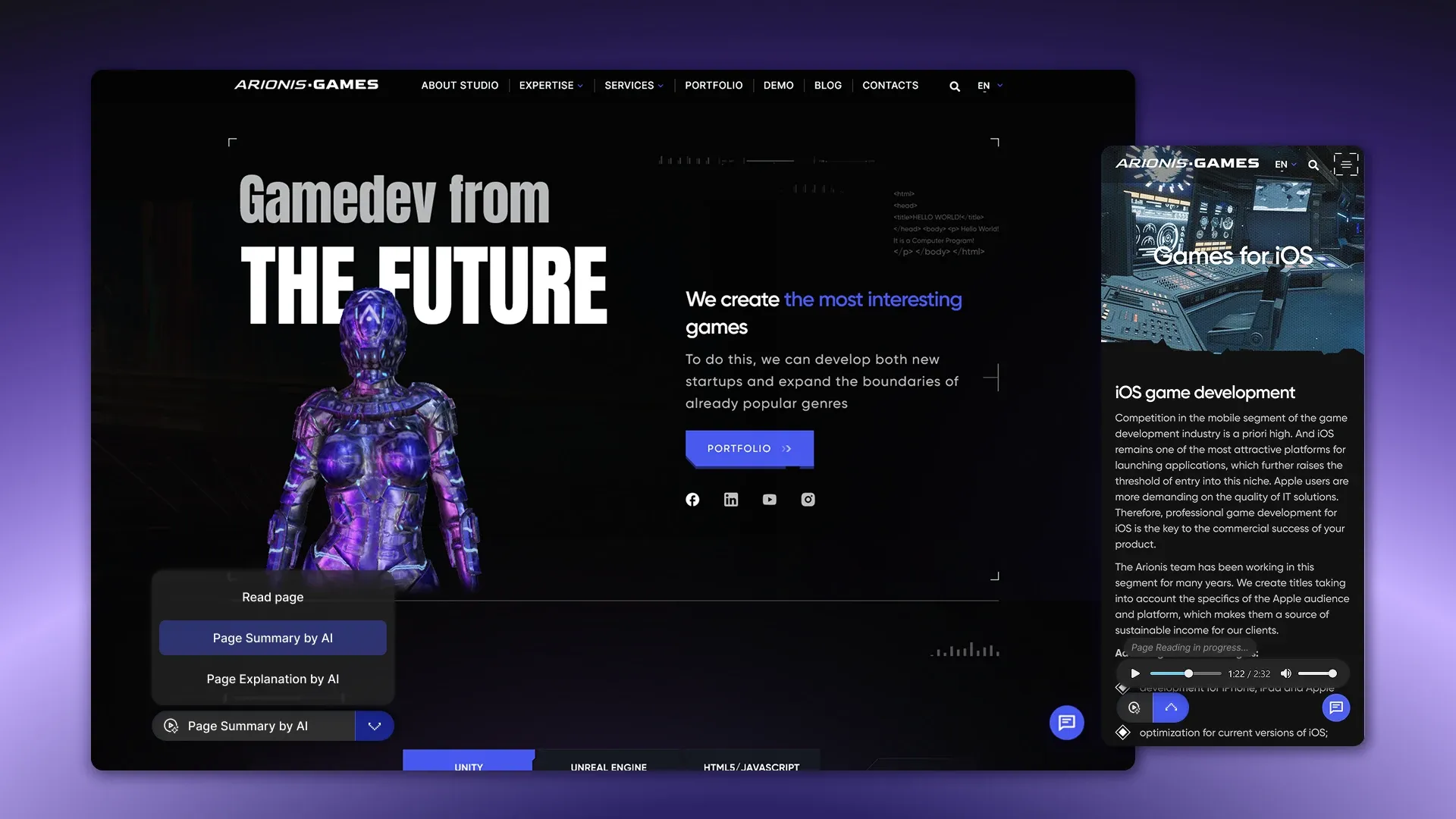
Most users don't read long texts — they scan the page and leave without getting to the point. An AI audio assistant solves this problem: it reads the page content aloud, generates a brief summary, or explains complex material in simple terms. Users choose the mode — full listening, overview, or explanation and interact with the content in their preferred format.
CortexIntellect developed just such a module, a compact widget with a mini-player. The widget supports three operating scenarios, synchronizes the text transcript with the playback, and is easily embedded on any website.
The result is increased user engagement and increased time on page.
3. AI-generated content for pages and blogs
Content marketing works, but it requires consistent effort: writing articles, service descriptions, case studies, and landing page copy costs time and money. An AI assistant accelerates this process: based on the topic, key points, and tone of voice of the company, it generates structured texts that a copywriter or marketer then polishes. This isn't a replacement for the author, but a starting point: the structure and initial draft are already in place; all that remains is to polish the text to the desired quality.
The bottom line: Companies that use AI in their content processes publish materials 3-4 times more often with the same team, which directly impacts organic traffic and search rankings.
A particular class of solutions is particularly relevant for online stores: AI can automatically generate product descriptions, adapting the style to the category and highlighting the key benefits of each item.
We've covered these tools and their use in e-commerce in detail in a separate article: 👉 [TOP 10 Most Effective AI Tools for E-Commerce]

4. Smart site search with context understanding
Standard search searches for exact matches of words. Smart search understands the intent of the query: if a user types "I want to automate hiring," the system finds relevant pages about HR tools, even if the word "hiring" isn't mentioned. This search shortens the path to the desired information, keeps the user on the site, and increases the likelihood that they'll find exactly what they're looking for.
Practical result: sites with semantic search experience a decrease in bounce rate and an increase in pageview depth.
5. Real-time AI-based content personalization
A website displays the same content to all visitors, regardless of whether they're a new user or a regular customer, a small business owner or a corporate buyer. AI personalization changes this: the system analyzes visitor behavior, traffic sources, and interaction history, and tailors content, offers, and recommendations to the specific user right at the moment of their visit.
Companies that have implemented personalization at the website level report an average increase in conversion rates of 15-30% compared to static content.

6. Automatic lead qualification
Not every lead who submits a request is ready to buy. The AI system analyzes user data — answers to questions, website behavior, and company characteristics — and assigns a score to each lead, measuring how well they match the target profile, what stage of the decision-making process they are at, and what their priority is for the manager. This allows the sales team to focus on hot leads and avoid wasting time on irrelevant inquiries.
The result of implementation: managers stop working according to the principle “all requests are equally important” and begin to move the funnel consciously.

7. AI chat with 24/7 support and transfer of dialogue to a manager
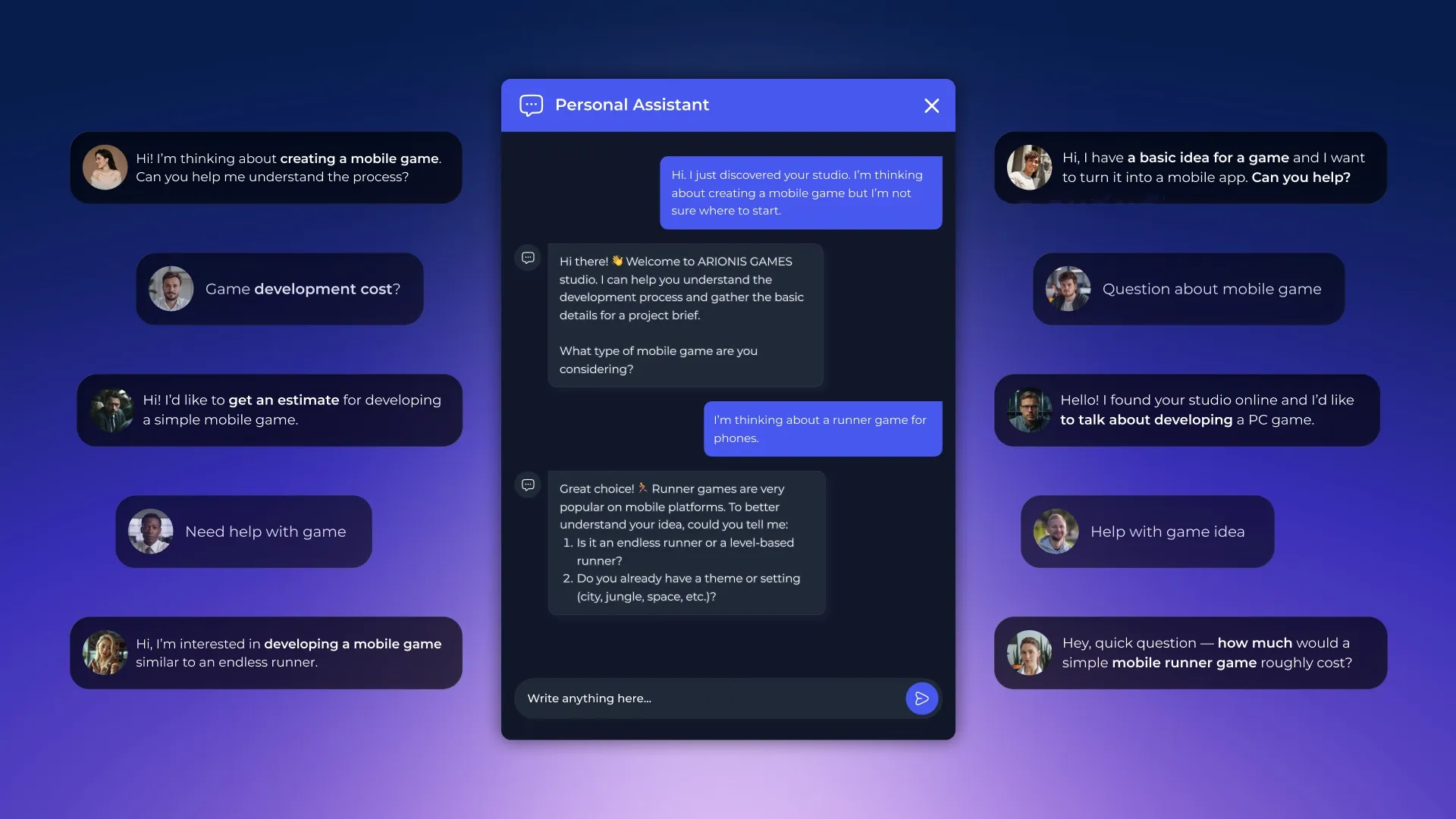
Clients don't just contact us during business hours. AI chat handles inquiries 24/7: it answers common questions, collects contact information, and clarifies the task. When a request requires live engagement, it transfers the conversation to a manager with the full context of the conversation, so the specialist doesn't start the conversation from scratch.
The key advantage of this solution is the speed of response. A customer who receives a response within a minute is much more likely to continue the conversation than one who waits several hours.
Built-in AI translation works for both parties in real time: a client writes in Spanish, Arabic, or any other language — the manager sees the text in their own language, responds in their own language, and the client reads it in their own language. For businesses that receive traffic from multiple countries, this directly accelerates the sales cycle without adding additional staff.
If your website is an online store, AI chat can function not just as support, but as a fully-fledged virtual salesperson: helping with product selection, comparing items, and guiding customers through to the final order.
Read more in our article 👉 [TOP 10 most effective AI tools for e-commerce].
8. AI analysis of feedback and reviews
Customer reviews contain valuable information: what works, what annoys, and where questions arise. Manually analyzing a large stream of feedback is labor-intensive. An AI system automatically categorizes reviews by topic, identifies recurring patterns, determines sentiment, and generates a summary of key findings. Business owners receive not just a trove of text, but a structured picture of the customer experience.
This makes it possible to make decisions about improving a product or service based on real data, rather than intuition.

9. AI form with dynamic questions
A standard application form collects the same fields from everyone, regardless of what the client needs. An AI form works differently: it adapts the set of questions based on the user's responses in real time. If the client has selected a specific type of service, the next question clarifies this specific scenario. Unnecessary fields are not displayed at all.
The bottom line: requests arrive with relevant data, managers spend less time on follow-up, and form conversion rates increase — because users respond to a short, personalized script rather than filling out a long, generic questionnaire.
10. AI scoring of website pages
A website can look good but systematically lose customers at specific stages — and the business owner isn't aware of it because standard analytics only show numbers but don't explain the reasons. AI scoring analyzes user behavior on every page: where they linger, which sections they skip without reading, at what step they close the tab, and where they lose momentum toward completing a request.
Based on this data, the system assigns a score to pages and generates specific recommendations: which block should be moved higher, where a call to action is missing, which section generates the most exits. The owner receives not just a heatmap, but a structured conclusion about what exactly is hindering conversion and what needs to be changed first.
Practical result: decisions about website improvements are based on actual audience behavior, not intuition or guesswork. This reduces the number of iterations needed to improve pages and accelerates the achievement of a stable flow of applications.

How to add AI features to your website
Each of the listed features is a standalone module that plugs into an existing website without affecting its core architecture. The website isn't rewritten or migrated to a new platform. The module is built on top of what's already there.
The basic integration scheme is the same for all functions:
- An entry point for the user appears on the website side - a widget, button or form.
- A user's action triggers a request that goes to the backend, where it is processed by an AI model, and the result is returned back to the website interface, CRM, manager email, or multiple channels simultaneously.
- The visual part is connected via a small piece of code in the page body and adapts to the website design.
Most functions operate through language model APIs — OpenAI and similar platforms. This means that the bulk of the computing load is carried out by the provider, not the website's servers. Scaling occurs automatically: the same module operates equally reliably with 10 or 10,000 requests per day.
Functions that work with company data — consultant, commercial agent, semantic search — additionally require the creation of a knowledge base. Documents, price lists, website pages, and other materials are indexed and loaded into a vector database. This is where the AI gets context for its responses, rather than generating information out of thin air. The database is updated as company materials change.
The most effective scenario is when AI functions are built into the website architecture during the development stage, rather than added to an existing solution. Custom development allows for the proper data structure to be established from the start, AI modules to be connected, and the tradeoffs that inevitably arise when integrating into an existing website. As a result, functions run faster, are more deeply integrated into business processes, and are easier to scale as the company grows. A website designed with AI in mind from the start becomes a fully-fledged customer service tool, not a collection of modules tacked on top of a static platform.
The implementation time depends on the complexity of the feature and the infrastructure readiness. Simple modules based on a ready-made API are launched in one to two weeks. Solutions with a proprietary knowledge base, CRM integration, and custom dialog logic require three to six weeks, including configuration, testing, and training on company data.
Want to learn which AI features work specifically for e-commerce? In another article, we explored tools specifically designed for online stores and trading platforms — 👉 [AI Features for Online Stores]
Let's discuss your project
Whether you're looking to implement a specific feature or build a full-fledged AI infrastructure for customer service, the CortexIntellect team is ready to analyze your needs and offer a suitable solution. Submit a request on our website, and we'll discuss which features are relevant for your business, how to implement them, and where to start.

