



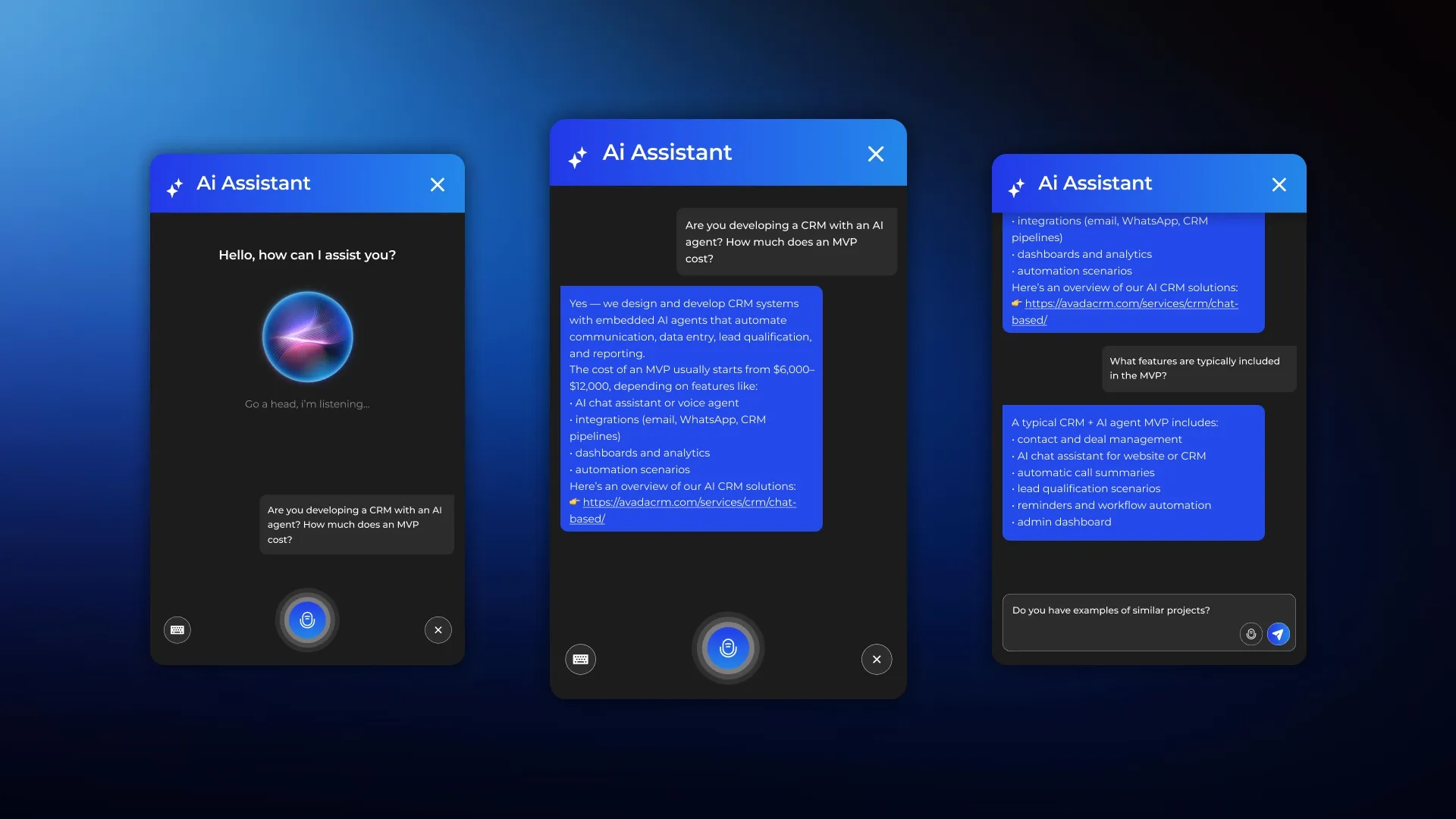







The CortexIntellect team developed a voice-activated AI assistant for the website, which helps visitors receive real-time consultations, navigate the company's services, and move from casual inquiries to completed requests.
This isn't just a voice-activated widget or a typical FAQ bot. The solution was designed as a pre-sale tool that combines several roles: service consultant, website navigator, AI assistant for solution selection, and brief assistant to help gather initial project requirements. This mission statement was built into the product's very concept: the assistant should not only answer questions but also gently transition the user to the next step — a request form, contacting a manager, forwarding a brief to the sales department, or another targeted action.
Technologies: OpenAI, ElevenLabs, Python, RAG, Vector DB, Webhooks, CRM Integrations.




About the project
The project's goal was to develop a voice-activated AI assistant for websites that would provide real-time voice consultation to users, understand their questions, utilize the company's knowledge base, and help users navigate the complex landscape of services and digital solutions.
Unlike traditional chatbots, which often operate on limited scripts or respond as a help desk, this assistant was designed to act like a live digital consultant: first responding to the point, then carefully clarifying the context, then suggesting a useful next step and, at the appropriate moment, helping to quickly formulate a brief project brief.
The project's goal wasn't simply to create a new AI feature for the website, but to address specific business challenges: increasing visitor engagement, increasing the website's conversion rate into leads, lowering the barrier to entry for clients, reducing the workload on the sales department during the initial qualification stage, and improving the quality of incoming inquiries.
Business problem
When a company sells complex services — for example, CRM development, custom platforms, integrations, business process automation, Web3 solutions, crypto projects, or game development — most users arrive at the website without a clear understanding of what exactly they need.
Requests vary greatly: one client is interested in cost, another formulates the problem in a very abstract way, and still another doesn't understand what kind of solution they need—a chatbot, an internal system, or a comprehensive development with integrations. At the same time, many want a quick answer without delving into lengthy texts or filling out forms.
In a typical scenario, such requests are forwarded to managers. The team wastes time on basic consultations, explaining the same things over and over again, trying to manually gather requirements, clarify the task, and determine whether the request is even relevant. Meanwhile, some users don't proceed to the request because they don't want to fill out the form, don't understand what to write, or simply put off contacting them. As a result, the business loses potential leads, and managers receive unstructured incoming requests.
A tool was needed that could initiate communication in place of a manager, but without feeling like a dry questionnaire or an intrusive scripted bot. That's why the project chose a voice-activated AI assistant that communicates naturally, responds immediately, understands the user's intentions, and helps them move to the next step at the right moment. This format aligns with the original concept of the solution: the assistant should be more than just a help desk bot, but a pre-sales consultant and application preparation assistant.
Solution concept
We designed the assistant as a multi-layered AI system that combines four operating modes.
- The first mode is info mode. In it, the assistant answers routine questions about the company, services, cases, technologies, deadlines, work format, and communication methods.
- The second mode is consult mode. In this mode, AI doesn't just provide information, but helps the user understand which solution format is right for them: MVP or full-scale development, CRM or a separate module, integration or a full-fledged system.
- The third mode is brief mode. If the user is ready to discuss the project in detail, the assistant asks a limited number of short clarifying questions, collects key input information, and generates a structured summary of the request.
- The fourth mode is lead handoff mode. When sufficient data is available, the system prompts the user to submit a brief briefing to a manager, requests contact information, and sends the information to a CRM, email, Telegram, or another channel. These modes and the logic for automatically switching between them were specifically designed into the solution's architecture.
A particularly important principle was the conduct. An assistant should not interrogate, ask long chains of dry questions, push sales, demand contact information prematurely, or invent deadlines and budgets.
The correct formula for dialogue is described as: response → gentle clarification → useful recommendation → next step.
It is precisely because of this communication model that the tool functions as a real digital consultant, and not as a form of qualification disguised as a chat.

What can an AI voice assistant do?
The solution covers several key user scenarios.
Consultation on services and the company
Users can use voice or text to ask questions about the company's activities, services, technologies, and whether it develops CRM, AI bots, AI assistants, mobile apps, or custom platforms. The assistant responds based on its knowledge base and can tailor its wording to the current context of the website and page. This help desk scenario was included as a standard.
Site navigation
The assistant understands the user's current location and which section of the website they are viewing, and can help them navigate to the desired page, case studies, contacts, or relevant service. If technically feasible, it not only opens the URL but also scrolls to the desired block or highlights the interface element. The technical specifications for the solution explicitly address page context, website navigation, section navigation, and relevant CTAs.
Presale consultation
If a user asks a question like "What's best for me?", "Do I need a bot, a CRM, or an AI assistant?", or "Do I need an MVP or a full-fledged development?", the system doesn't just provide help, but explains the differences between the options and helps navigate them.
Collecting a brief
When a user is interested in discussing a project, the assistant offers to help quickly formulate a request, asks 3-5 unobtrusive clarifying questions, and collects structured information: project type, business niche, solution level, desired functionality, reference availability, deadlines, budget target, and contact method. The system then generates a brief, structured summary.
Transferring the lead to the manager
Once sufficient information has been collected, the assistant offers to forward the resume to the manager, requests contact information, and saves the data into the system. The information is then sent to the CRM.

How the system works
- The user presses the button to launch the voice assistant.
- The site requests access to the microphone, after which the assistant greets the user and invites them to ask a question.
- Further, two formats of interaction are possible: the person speaks by voice or writes by text.
- The system recognizes speech, determines the user's intent, and selects the appropriate mode: simply answer, help with navigation, advise on the solution format, or switch to brief assistant mode.
- If, during the conversation, it becomes clear that the user is interested in the project, the AI gently transitions the conversation to a briefing mode.
- After receiving a sufficient amount of input data, the system offers to submit a short request to the manager and ask for contact.
- After this, the brief and contact information are sent to the CRM, and the user receives confirmation of the next step.
UI/UX solutions
The interface features a compact floating widget that does not interfere with the user's viewing experience, does not launch automatically without user input, and does not take up too much space.
The widget includes a button to start a voice dialogue, an indication that the assistant is listening, a response indicator, the ability to end the conversation, and a switch to text mode.
The dialogue interface includes a voice mode, a text mode, recent remarks, brief hints on what you can ask, and a separate button for sending a request to a manager.

Technology and architecture
This is one of the most important parts of the project, because it is the architecture that determines whether the assistant will be useful, fast, and scalable.
- Voice layer: real-time speech interface
For voice interaction, the project utilized the conversational voice AI stack — the ElevenLabs Conversational AI Platform. It provides natural voice-over, real-time voice dialogue, and the overall quality of the voice layer. This allows the assistant to not simply display text on the screen but to conduct full-fledged voice communication, which is especially important for user engagement and convenience on the website.
- LLM core and reasoning
OpenAI was used as the language core for query understanding, reasoning logic, response generation, and brief summary generation. This choice is not arbitrary: in this architecture, LLM is used not only as a text generator but also as a dialogue orchestrator, which determines user intent, helps select the assistant's operating mode, maintains the context of the conversation, and generates useful rather than formulaic responses. LLM is also used separately for brief generation logic — to transform disparate user responses into a structured, concise brief.
- Knowledge base and RAG
The assistant's key feature is that it should respond not "generally," but based on company-specific knowledge. The system operates not only on website content but also on a separate, structured knowledge base. This database includes a company description, list of services, development areas, project flows, FAQs, implementation stages, case studies, timeline and budget benchmarks, lead qualification rules, request transfer scenarios to the sales department, and CTA logic.
To work with such data, the architecture includes a RAG/knowledge retrieval layer —searching for relevant information from the knowledge base and then transferring the context to the LLM. The project used Vector DB. This allows for scalability: updating knowledge without rewriting code, enabling new services, editing sales logic, and adapting the assistant to different websites or website sections.
- Conversation state and session memory
To prevent the conversation from degenerating into a series of disconnected lines, the assistant must remember what the user has already said, the type of project being discussed, the current stage of the conversation, the collected briefing data, the current page, and the best next step to suggest. The system includes a separate session state layer that maintains context within a single session. This is especially important for brief mode, when the assistant asks questions step by step and collects information in several steps rather than in a single request.
- Frontend part
On the frontend, the solution includes a voice widget, a dialog UI, microphone connectivity, status display, site navigation control, and backend request processing. This means it's not just an iframe with an external chat, but a fully-fledged interface layer integrated into the website and capable of interacting with the page: understanding context, triggering transitions, scrolling through blocks, and functioning as a native part of the digital product.
- Backend part
On the server side, the architecture includes user request processing, conversation state management, intent detection, LLM integration, knowledge retrieval, response generation, brief mode and handoff logic, as well as integration with CRM and webhook channels. The backend orchestrates this entire tool: it receives an event from the website, initiates processing, determines the response scenario, integrates company knowledge, generates the final response, and decides whether to transfer the user to a manager.
- Integrations
API integrations became a key part of the project. The architecture included integrations with the LLM API, voice/TTS API, speech-to-text, CRM webhook infrastructure, and event analytics. In practice, this means the assistant can be integrated into the company's existing sales process: transferring a brief to the CRM, sending a short lead to a manager, recording the start of a conversation, recording the successful transfer of a contact, or tracking which pages the solution performs best on.
Stages of implementation
The design logic was broken down into several stages.
During the first stage, an MVP was implemented: a voice widget, answers based on company knowledge, basic site navigation, text fallback, and a simple transfer of contact to a manager.
In the second stage, brief mode, session memory, structured summary, and brief transfer to CRM/Telegram/email were added.
The solution can be further expanded to include interface block highlighting, smarter lead qualification, on-page personalization, multilingual support, and advanced analytics.
Business value of the solution
Implementing a voice-activated AI assistant for a website helps a company solve several problems at once:
Firstly, it increases visitor engagement. The voice format itself lowers the barrier to entry: it's easier for users to ask questions by voice than to read long pages or fill out a form.
Secondly, the website's conversion rate to leads increases. The assistant doesn't just respond, but leads the user to the next step: showing them a relevant service, helping them decide on a solution, compiling a brief, and transferring the contact information to a manager.
Third, the workload on the sales team is reduced. The initial consultation, basic qualification, and input data collection are automated, and the manager receives a more prepared and structured lead.
Fourth, the quality of communication improves. Responses are standardized but remain personalized due to the page context, knowledge base, and dialogue logic.
Result
As a result, a voice-activated AI assistant was designed and implemented for the website. It helps users navigate the company's services, answers questions, helps them understand their needs, smoothly compiles a brief project brief, and transfers the conversation to a manager. This is exactly the expected result outlined in the task statement: not a help bot, but a pre-sales assistant that increases the website's conversion rate into high-quality leads.
Want to integrate a voice-activated AI assistant into your website?
We'll analyze your user scenarios, prepare the architecture, build a knowledge base, configure voice AI, LLM logic, brief mode, and CRM integration.
As a result, you'll receive not just an AI widget, but a tool that helps the site consult, qualify, and sell.
👉 Submit a request - let's discuss your project.

